Giada
Your hardcore loop machine.

Giada - Your Hardcore Loopmachine

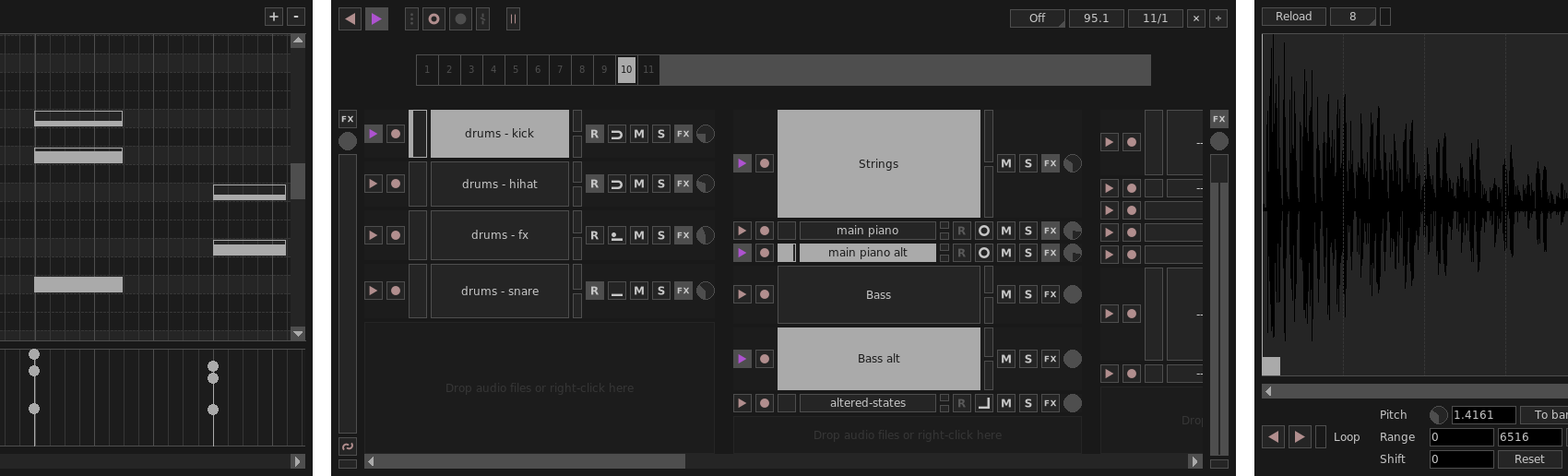
Giada is an open source, minimalistic and hardcore music production tool. Designed for DJs, live performers and electronic musicians.

➔ See it in action!

Features.

1. Giada is a loop machine.

Build your performance in real time by layering audio tracks or MIDI events, driven by the main sequencer.

2. Giada is a sample player.

Load samples from your crates and play them with a computer keyboard or a MIDI controller.

3. Giada is a song editor.

Write songs from scratch or edit existing live recordings with the powerful Action Editor, for a fine-tuned control.

4. Giada is a live recorder.

Record sounds from the real world and MIDI events coming from external devices or other apps.

5. Giada is an FX processor.

Process samples or audio/MIDI input signals with VST instruments from your plug-ins collection.

6. Giada is a MIDI controller.

Control other software or synchronize physical MIDI devices by using Giada as a MIDI master sequencer.

Lightweight and powerful.

Designed for live performances.

Powerful multi-threaded audio engine.

Super sleek interface, no exotic stuff.

VST3, LV2 and MIDI I/O support.

Tons of tools and modes to craft your songs.

100% open-source GPL.

For Linux, Windows, macOS and FreeBSD.

Download.

Latest version

1.5.0, Leshy

Released on June 17, 2026

Linux

Flatpak

⇩ get it! ⇩

Windows

x86-64

⇩ get it! ⇩

macOS

arm64

⇩ get it! ⇩

Source code

⇩ get it! ⇩

Changes in version 1.5.0 Leshy

This release introduces a major overhaul of Giada's timing and sequencing engine, with a new tick-based internal timeline that improves musical precision across editing and playback. It also improves plug-in and MIDI workflow, adds CPU load monitoring to the main window and includes a broad round of internal cleanup and UI polish.

  • New tick-based audio rendering engine, improving consistency across sequencing, playback and action editing;
  • Rework the internal storage of actions, improving performance and simplifying action handling;
  • Allow plug-ins that generate MIDI to forward their output to subsequent plug-ins;
  • Improve transport and position reporting for plug-ins;
  • Add CPU load meter in the main window, along with a new footer area with extra information;
  • Fix audio glitches while saving a project;
  • Fix wrong sample range points computation when the system sample rate changes;
  • Include broader internal cleanup, refactoring, dependency updates and UI polish.

Follow us.

Facebookinstagramgithubyoutubekvr audio